How to Use Kia Apple CarPlay®

2019 Kia Sedona Apple Carplay
 

If you’re like other Kendall drivers, your smartphone and your car are critical components of your day-to-day routine. Fortunately, Apple CarPlay® now allows them to work together to make your life easier and your Miami drives safer. So, what is Apple CarPlay®, exactly, and how does it work? Find out how to use Kia Apple CarPlay® and which Kia models have Apple CarPlay® with the team at South Dade Kia of Miami below! 


What is Apple CarPlay®?

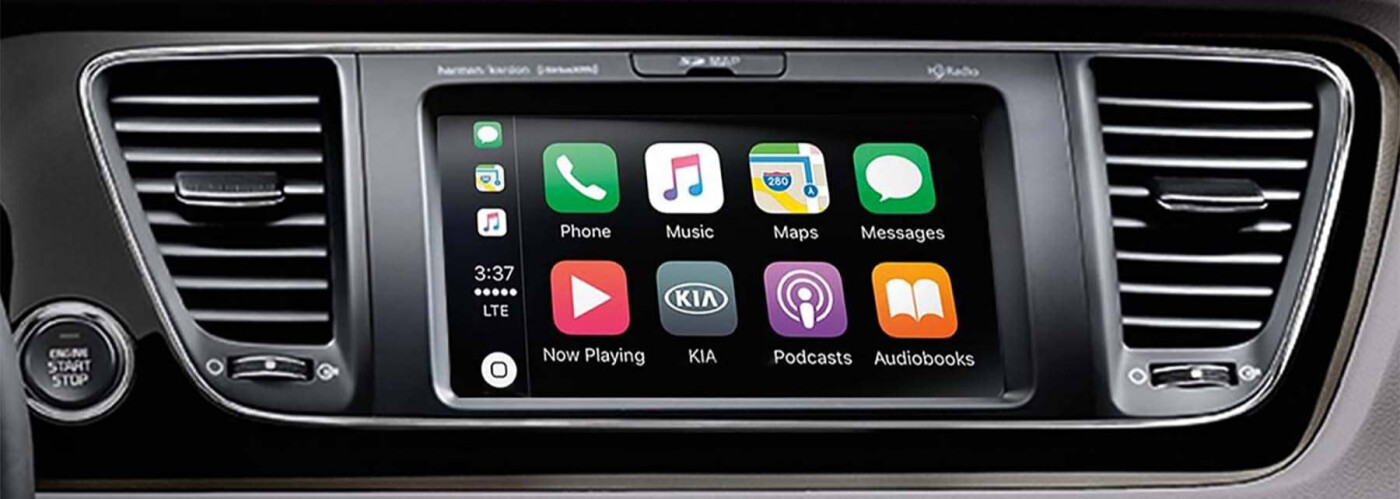
Apple CarPlay® is a software that allows you to sync your iPhone with your Kia’s UVO interface. This means that you can display certain iPhone applications on your vehicle’s infotainment screen, which offers numerous advantages to your Miami drives. You can get directions, send and receive messages/calls, and listen to music – all while staying focused on the Miami roads ahead. What’s not to love?

How to Use Kia Apple CarPlay®

If you’re wondering how to set up Kia Apple CarPlay®, you’ll be pleased to know that it is quite straightforward. Simply follow these steps below:

  • Press the ‘setup’ key on your UVO interface, and then press ‘connectivity.’ From the list of options, click ‘Apple CarPlay®,’ and ensure it’s turned on.
  • Return to the home screen and connect your phone to your Kia’s USB port. Your phone will be detected by the UVO system, and you will see the CarPlay icon displayed on your home screen.
  • After agreeing to the terms and conditions, all you’ll need to do is press the Apple CarPlay® button to access your smartphone apps. It’s that easy!

Which Kia Models Have Apple CarPlay®?

Now that you know how to set up Kia Apple CarPlay®, you may be wondering which Kia models have Apple CarPlay®. Here is just a sampling of the Kia models that offer Apple CarPlay®:

  • Kia Rio (2018-present)
  • Kia Sorento (2017-present)
  • Kia Sportage (2017-present)
  • Kia Stinger (2018-present)
  • Kia Soul (2014-present)
  • Kia Niro (2022-present)
  • Kia EV6 (2022-present)
  • Kia Carnival (2022-present)
  • Kia Forte (2017-present)

Questions About How to Use Kia Apple CarPlay®?

If you’re interested in experiencing this innovative technology for yourself, why not set up a test drive at South Dade Kia of Miami? We’re just a short drive from Pinecrest. If you have any questions about how to set up Kia Apple CarPlay®, please don’t hesitate to reach out. We’re here to help! In the meantime, feel free to learn more about the Kia lineup.


More from South Dade Kia of Miami

  • 2026 Kia Sportage Performance

    Whether you’re tackling your favorite trails or your morning commute, the Kia Sportage is up to the challenge. Boasting an impressive inline four-cylinder engine and a wide range of drive modes to help you fine-tune your performance, the 2026 Kia Sportage ensures you’re ready for whatever the Miami roads throw your way. Learn more about…

  • 2026 Kia Sportage Hybrid Trim Levels

    Are you shopping around Miami for an SUV that blends high performance with exceptional fuel efficiency? The 2026 Kia Sportage Hybrid delivers the perfect balance. Whether you’re eyeing the sleek, feature-rich Kia Sportage Hybrid SX Prestige, the tech-savvy Kia Sportage Hybrid EX, or any of the other trims in the lineup, you’ll find something to…

  • 2026 Kia Sportage Hybrid Performance

    Whether you’re commuting across Miami or heading out for a weekend drive, the 2026 Kia Sportage Hybrid blends efficient engineering with energetic output. Thanks to its advanced powertrain, standout Kia Sportage Hybrid mpg ratings, and available Kia Sportage Hybrid AWD capability, this crossover is built for drivers who refuse to compromise on either performance or…

South Dade Kia of Miami 25.6105138, -80.3487766.
;